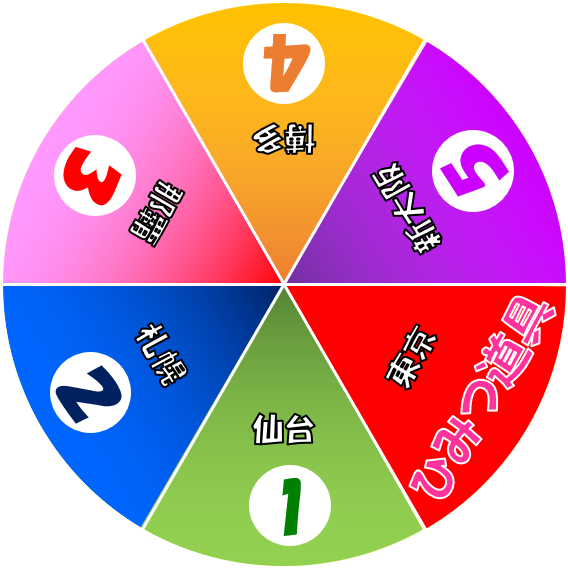
「どこでもドラえもん日本旅行ゲーム」(通称ドラえもんゲーム)を持っているのですが、使いこみすぎてルーレットがいつも「ひみつ道具」で止まるようになってしまい、一向にゲームが進まなくなっていました。
Unity勉強中ですが、「Unity5 の教科書」の例題で、ちょうどルーレットを作るというのがありましたので、それを参考に拡張しました。
例題では、タップするとルーレットが決まったスピードで回転するというものでしたが、指のスワイプの方向やスピードに合わせて回転するようにしました。画像もドラえもんゲームのルーレットを意識して、パワポで作りました。
スマホでサクサクうごきます。初のAndroidアプリです。
よっしゃー、これでドラえもんゲームまたできるぞ!
ポイントは、
1.画面の座標系からワールド座標系への変換と、
[crayon]
Vector2 startPos = Camera.main.ScreenToWorldPoint(pos);
[/crayon]
2.座標か角度への変換です。
[crayon]
this.prevTheta = Mathf.Atan2(startPos.y, startPos.x) * Mathf.Rad2Deg;
[/crayon]
ルーレットのメインのプログラムは以下です。
using System.Collections;
using System.Collections.Generic;
using UnityEngine;

public class RouletteController : MonoBehaviour
{
    float startTheta = 0;
    float prevTheta = 0;
    float rotSpeed = 0;

    // Start is called before the first frame update
    void Start()
    {

    }

    // Update is called once per frame
    void Update()
    {
        if (Input.GetMouseButtonDown(0))
        {
            Vector2 pos = Input.mousePosition;
            Vector2 startPos = Camera.main.ScreenToWorldPoint(pos);
            this.prevTheta = Mathf.Atan2(startPos.y, startPos.x) * Mathf.Rad2Deg;
            this.startTheta = this.prevTheta;
        }
        else if (Input.GetMouseButton(0))
        {
            Vector2 pos = Input.mousePosition;
            Vector2 startPos = Camera.main.ScreenToWorldPoint(pos);
            this.prevTheta = this.startTheta;
            this.startTheta = Mathf.Atan2(startPos.y, startPos.x) * Mathf.Rad2Deg;
            this.rotSpeed = (this.startTheta - this.prevTheta);
            transform.Rotate(0, 0, this.rotSpeed);
        }
        transform.Rotate(0, 0, this.rotSpeed);
        this.rotSpeed *= 0.98f;
    }
}
コメントを残す