キーボードでFingalone を動かすためのプログラムを作ります。Assets で右クリック、Create > C# Script を選びます。
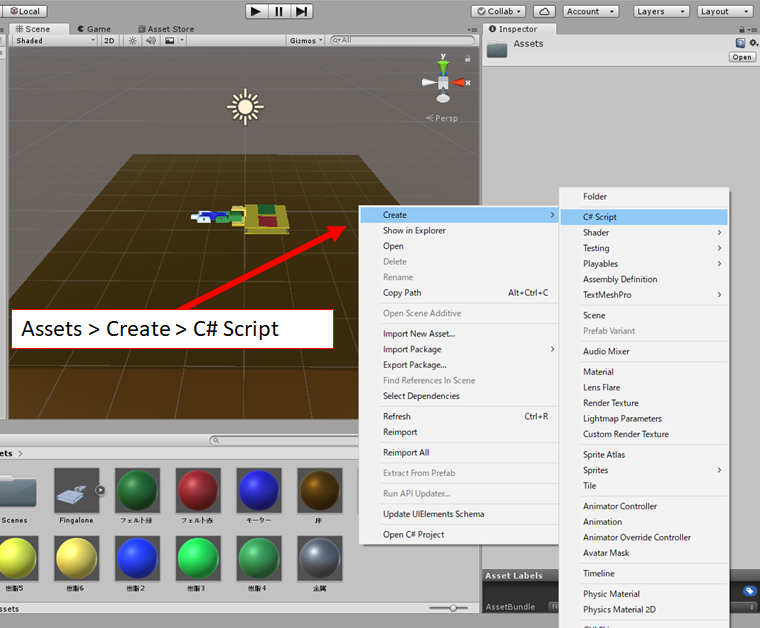
C# をダブルクリックすると、Visual Studio が起動します。キーボードでFingalone を動かすために以下のプログラムを作ってセーブ。
using System.Collections;
using System.Collections.Generic;
using UnityEngine;

public class control_pattern : MonoBehaviour
{
    public GameObject Gameobject1;
    public GameObject Gameobject2;
    public GameObject Gameobject3;
    public GameObject Gameobject4;

    private HingeJoint joint;

    private Rigidbody rb1;
    private Vector3 init_pos1;
    private Quaternion init_rot1;

    private Rigidbody rb2;
    private Vector3 init_pos2;
    private Quaternion init_rot2;

    private Rigidbody rb3;
    private Vector3 init_pos3;
    private Quaternion init_rot3;

    private Rigidbody rb4;
    private Vector3 init_pos4;
    private Quaternion init_rot4;

    private float dA = 5;

    private HingeJoint hinge1;
    private float A1 = 0;
    private float A1_min = -90;
    private float A1_max = 90;

    private HingeJoint hinge2;
    private float A2 = 0;
    private float A2_min = -90;
    private float A2_max = 90;

    private HingeJoint hinge3;
    private float A3 = 0;
    private float A3_min = -90;
    private float A3_max = 90;

    private float[] pat_f1 = { 0, -120, -150 };
    private float[] pat_f2 = { 0, -40, 90 };
    private float[] pat_f3 = { 0, 0, 0 };
    private int i_f = 0;
    private int n_f = 3;

    private float[] pat_b1 = { -110, -110, 0 };
    private float[] pat_b2 = { 90, 0, 0 };
    private float[] pat_b3 = { 0, 0, 0 };
    private int i_b = 0;
    private int n_b = 3;

    private float[] pat_l1 = { 0, -40, -40, 0 };
    private float[] pat_l2 = { 90, 0, 0, 90 };
    private float[] pat_l3 = { -60, -60, 60, 60 };
    private int i_l = 0;
    private int n_l = 4;

    private float[] pat_r1 = { 0, -40, -40, 0 };
    private float[] pat_r2 = { 90, 0, 0, 90 };
    private float[] pat_r3 = { 60, 60, -60, -60 };
    private int i_r = 0;
    private int n_r = 4;


    // Start is called before the first frame update
    void Start()
    {
        rb1 = Gameobject1.GetComponent<Rigidbody>();
        init_pos1 = rb1.transform.position;
        init_rot1 = rb1.transform.rotation;

        rb2 = Gameobject2.GetComponent<Rigidbody>();
        init_pos2 = rb2.transform.position;
        init_rot2 = rb2.transform.rotation;

        rb3 = Gameobject3.GetComponent<Rigidbody>();
        init_pos3 = rb3.transform.position;
        init_rot3 = rb3.transform.rotation;

        rb4 = Gameobject4.GetComponent<Rigidbody>();
        init_pos4 = rb4.transform.position;
        init_rot4 = rb4.transform.rotation;

        hinge1 = Gameobject1.GetComponent<HingeJoint>();
        hinge2 = Gameobject2.GetComponent<HingeJoint>();
        hinge3 = Gameobject3.GetComponent<HingeJoint>();

    }

    // Update is called once per frame
    void ChangePos()
    {
        JointSpring hingeSpring = hinge1.spring;
        hingeSpring.targetPosition = A1;
        hinge1.spring = hingeSpring;

        JointSpring hingeSpring2 = hinge2.spring;
        hingeSpring2.targetPosition = A2;
        hinge2.spring = hingeSpring2;

        JointSpring hingeSpring3 = hinge3.spring;
        hingeSpring3.targetPosition = A3;
        hinge3.spring = hingeSpring3;
    }

    void Update()
    {
        if (Input.GetKeyDown(KeyCode.E))
        {
            i_f += 1;
            if (i_f >= n_f) i_f = 0;
            A1 = pat_f1[i_f];
            A2 = pat_f2[i_f];
            A3 = pat_f3[i_f];
            ChangePos();
        }

        if (Input.GetKeyDown(KeyCode.D))
        {
            i_b += 1;
            if (i_b >= n_b) i_b = 0;
            A1 = pat_b1[i_b];
            A2 = pat_b2[i_b];
            A3 = pat_b3[i_b];
            ChangePos();
        }

        if (Input.GetKeyDown(KeyCode.S))
        {
            i_l += 1;
            if (i_l >= n_l) i_l = 0;
            A1 = pat_l1[i_l];
            A2 = pat_l2[i_l];
            A3 = pat_l3[i_l];
            ChangePos();
        }

        if (Input.GetKeyDown(KeyCode.F))
        {
            i_r += 1;
            if (i_r >= n_r) i_r = 0;
            A1 = pat_r1[i_r];
            A2 = pat_r2[i_r];
            A3 = pat_r3[i_r];
            ChangePos();
        }

        if (Input.GetKey(KeyCode.Alpha1))
        {
            A1 = 0;
            A2 = 0;
            A3 = 0;
            ChangePos();
        }
        if (Input.GetKey(KeyCode.Alpha2))
        {
            A1 = -90;
            A2 = 90;
            A3 = 0;
            ChangePos();
        }
        if (Input.GetKey(KeyCode.Alpha3))
        {
            A1 = -90;
            A2 = -10;
            A3 = 0;
            ChangePos();
        }

        if (Input.GetKey(KeyCode.U))
        {
            A1 += dA;
            if (A1 > A1_max) A1 = A1_max;
            ChangePos();

        }

        if (Input.GetKey(KeyCode.J))
        {
            A1 -= dA;
            if (A1 < A1_min) A1 = A1_min;
            ChangePos();
        }

        if (Input.GetKey(KeyCode.I))
        {
            A2 += dA;
            if (A2 > A2_max) A2 = A2_max;
            ChangePos();

        }

        if (Input.GetKey(KeyCode.K))
        {
            A2 -= dA;
            if (A2 < A2_min) A2 = A2_min;
            ChangePos();
        }
        if (Input.GetKey(KeyCode.O))
        {
            A3 += dA;
            if (A3 > A3_max) A3 = A3_max;
            ChangePos();

        }

        if (Input.GetKey(KeyCode.L))
        {
            A3 -= dA;
            if (A3 < A3_min) A3 = A3_min;
            ChangePos();
        }


        if (Input.GetKey(KeyCode.Space))
        {
            rb4.velocity = new Vector3(0, 3, 0);
        }

        if (Input.GetKey(KeyCode.UpArrow))
        {
            rb4.transform.Translate(-0.1f, 0.0f, 0.0f);
        }

        if (Input.GetKey(KeyCode.DownArrow))
        {
            rb4.transform.Translate(0.1f, 0.0f, 0.0f);
        }

        if (Input.GetKey(KeyCode.LeftArrow))
        {
            rb4.transform.Rotate(0.0f, -5.0f, 0.0f);
        }

        if (Input.GetKey(KeyCode.RightArrow))
        {
            rb4.transform.Rotate(0.0f, 5.0f, 0.0f);
        }

        Vector3 pos = rb4.transform.position;
        if (pos.y < -10)
        {
            rb1.transform.position = init_pos1;
            rb1.transform.rotation = init_rot1;
            rb1.velocity = new Vector3(0, 0, 0);

            rb2.transform.position = init_pos2;
            rb2.transform.rotation = init_rot2;
            rb2.velocity = new Vector3(0, 0, 0);

            rb3.transform.position = init_pos3;
            rb3.transform.rotation = init_rot3;
            rb3.velocity = new Vector3(0, 0, 0);

            rb4.transform.position = init_pos4;
            rb4.transform.rotation = init_rot4;
            rb4.velocity = new Vector3(0, 0, 0);

        }

        // controller.Move(movedirection * Time.deltaTime);


    }
}
動かし方は
[u, j] 第一関節のモーター
[i, k] 第二関節のモーター
[o, l] 第三関節のモーター
[e, d, s, f]の連打モーターを使った前後・旋回移動
[1, 2, 3] 特定のポーズ
[↑, ↓, ← ,→]前後・旋回移動(モーターを使わない、インチキ移動)
[space] 浮遊
C#のプログラム名をcontrol_patternとする。プログラム内でのclass 名とファイル名が一致していないとエラーが出るので注意。このプログラムをFinger1にドラッグすると、右側のInspector にcontrol_pattern が追加される。その欄にGameObject1-4 があるので、◎をクリックして、Finger1-4 を割り当てました。
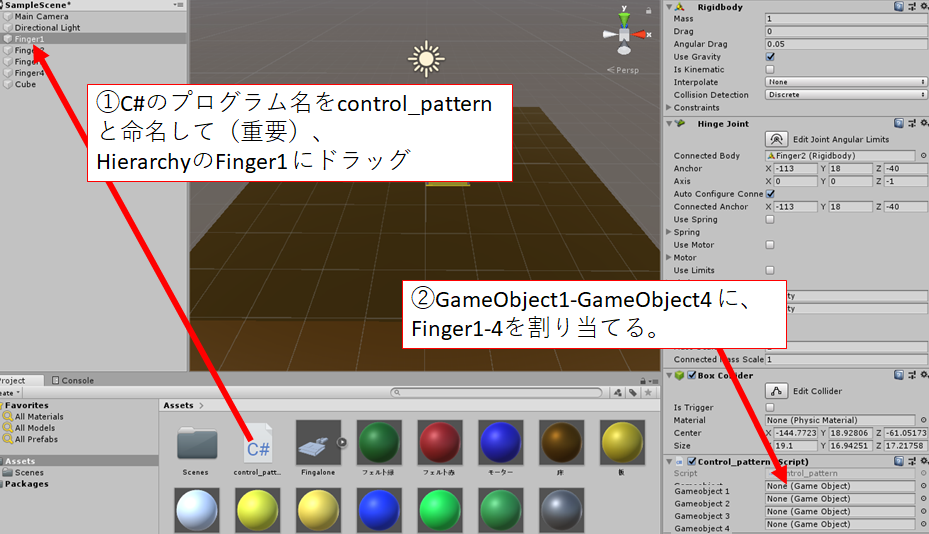
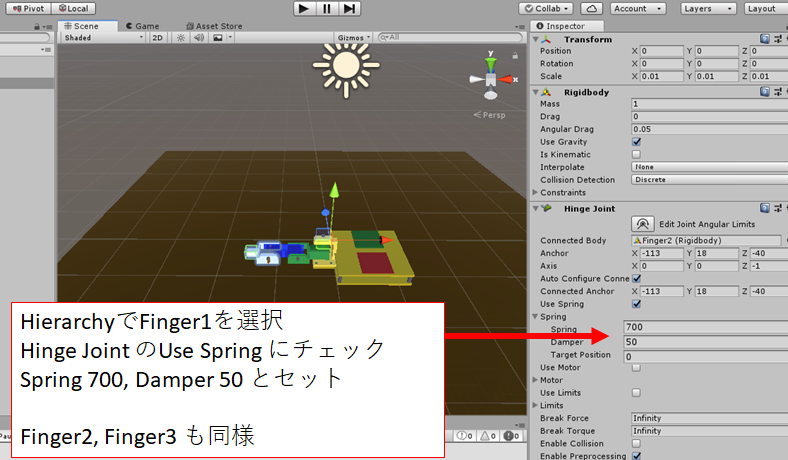
この状態で、カーソルキーでFingeronを動かせることはできますが、関節を動かすにはJointの物理特性を変更する必要があります。以下のように、Finger1のHinge Joint で、Use Spring にチェックを入れ、バネの強さ Spring 700, バネの遅さ Damper 50 とセット。Finger2もFinger3も同じようにセットしました。
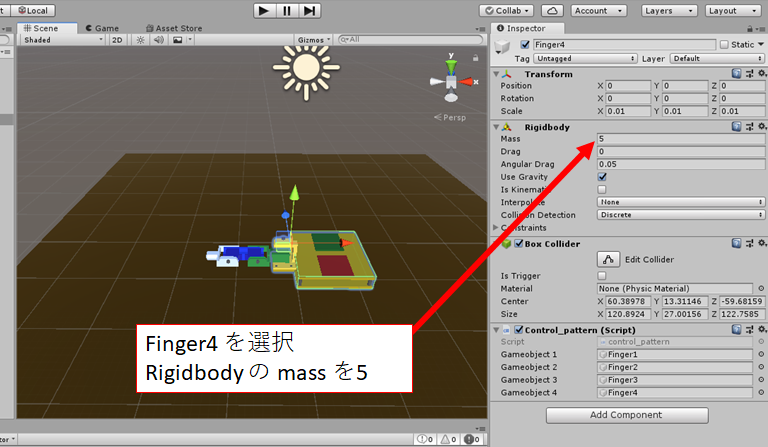
あとは、きちんと動くように物理パラメータを調節しました。Finger4 が軽すぎて動きの反動が大きいので、Rigidbodyのmass を5として重くしました。
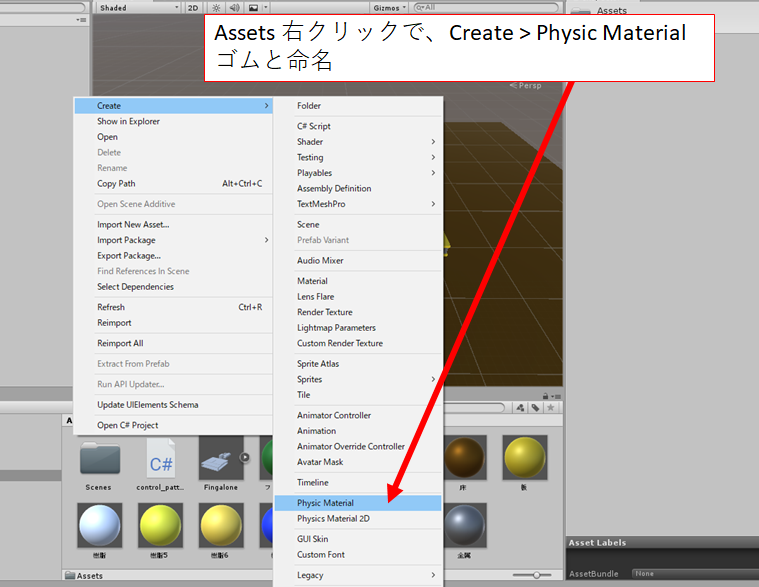
あとは、Finger1の先端の摩擦を強くして、進みやすくします。Assets で右クリック、Create > Physic Material を作成します。”ゴム”と命名しました。
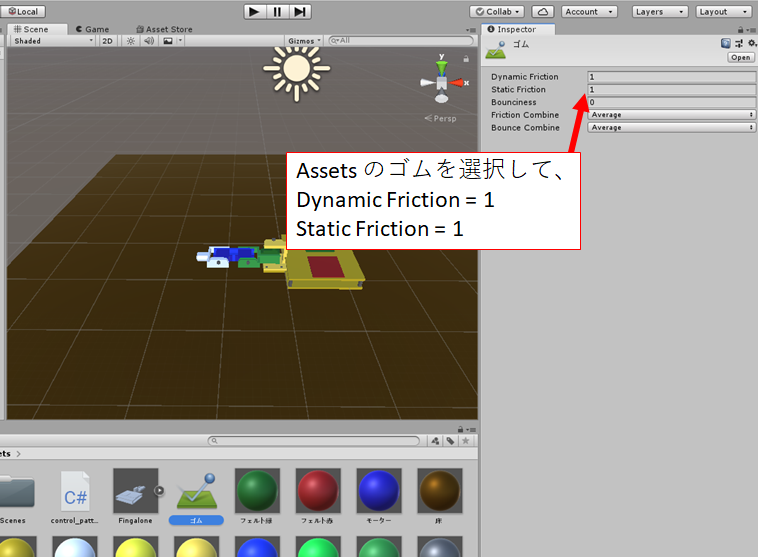
作成した”ゴム”を選択し、Dynamic Friction = 1、Static Friction = 1とセットして摩擦を最大にしました。
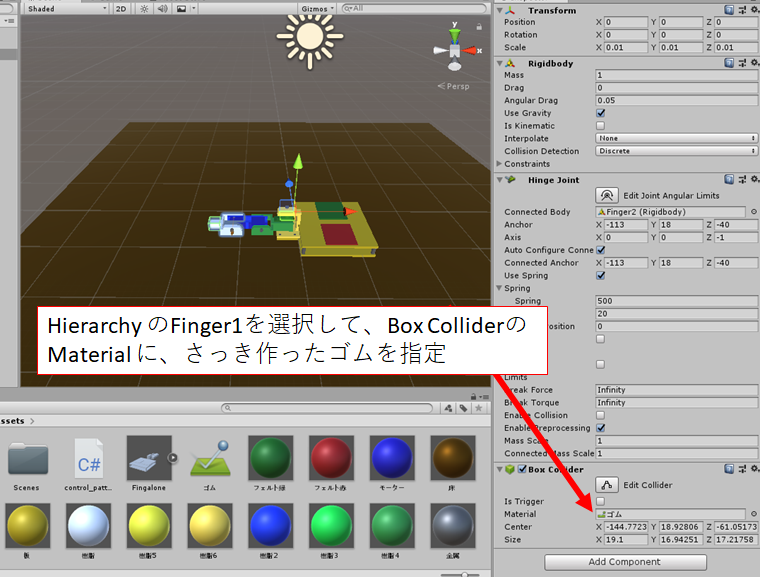
Finger1 の BoxCollider のMaterial に、◎をクリックしてさっき作った”ゴム”を選択しました。
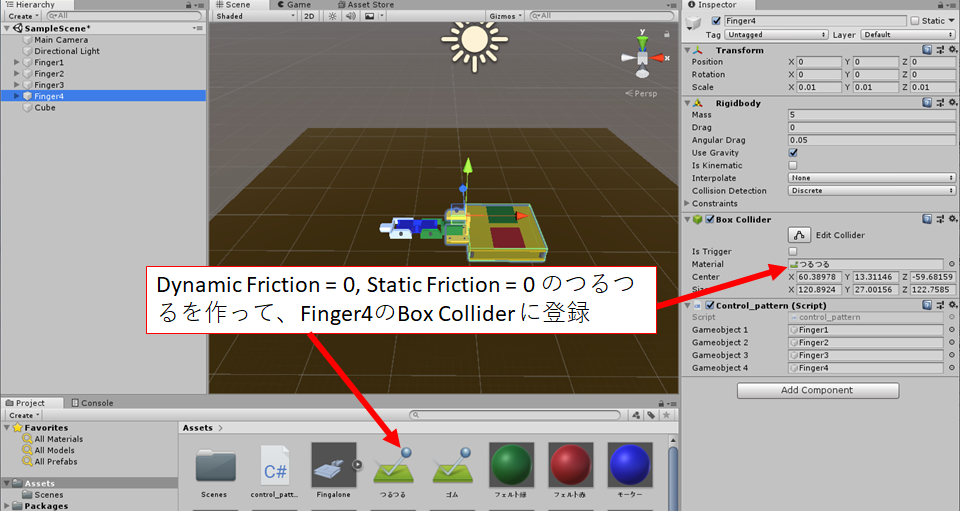
同様にして、Finger4は、つるつるにしました。
やったことは以上です。これでキーボード操作で自由にFingalone が動きました。